
Your phone heats up during intense gaming sessions, causing performance to drop right when you need it most. This frustrating thermal throttling happens because modern smartphones pack powerful processors into compact frames with limited cooling capabilities. Enter phone coolers—compact external devices that actively pull heat away from your device. But how does a phone cooler work to solve this problem? Understanding the science behind these devices reveals why they’re becoming essential for mobile gamers and power users who demand sustained peak performance from their devices.
When your phone’s temperature exceeds safe operating limits, the processor automatically slows down to prevent damage—a process known as thermal throttling. This can slash gaming frame rates by 20% or more within minutes of intense use. Phone coolers counteract this by creating an external heat dissipation pathway, allowing your device to maintain maximum performance during extended sessions. Let’s examine the precise engineering that makes this possible and how you can leverage it for optimal results.
Thermoelectric Cooling: The Heart of Modern Phone Coolers
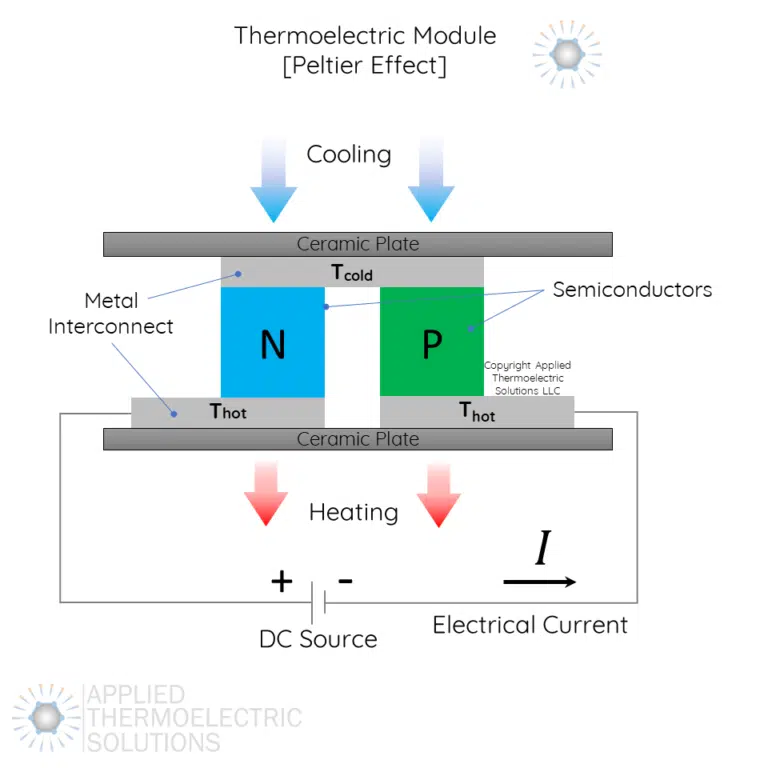
Most effective phone coolers rely on thermoelectric cooling technology, which operates through a fascinating physical phenomenon called the Peltier effect. When electrical current flows through a specialized semiconductor module, it creates a temperature differential—cooling one side while heating the opposite side. This isn’t just blowing air; it’s actively pumping heat away from your phone’s surface.
The Peltier Effect in Action
Inside every high-performance phone cooler sits a small but powerful thermoelectric module. When you connect power, electrons moving through the semiconductor junction absorb thermal energy from the phone-contact side, creating a cooling effect. Simultaneously, this energy gets released as heat on the opposite side of the module. What makes this technology superior to simple fans is its ability to create temperatures below ambient air temperature, sometimes reaching 15-20°C cooler than the surrounding environment.
Complete Heat Transfer Process
The cooling system works through a precisely engineered sequence:
- Direct Contact: The cooler’s cold plate makes flush contact with your phone’s back, typically where the processor generates the most heat (usually the upper-middle section)
- Heat Absorption: Thermal energy transfers from your phone into the cold side of the Peltier module through conduction
- Active Transfer: The Peltier element actively pumps this heat across to the hot side
- Heat Dissipation: A powerful fan blows air across aluminum fins on the hot side, carrying the heat away into the surrounding environment
This entire process happens continuously as long as power is supplied, creating a one-way heat highway away from your precious smartphone components.
Four Distinct Cooling Technologies Compared

Not all phone coolers deliver the same performance. Understanding the differences helps you select the right solution for your specific needs.
Peltier-Powered Cooling Systems
These represent the gold standard for serious mobile gamers. A premium Peltier cooler typically contains a 30-45W thermoelectric module capable of creating significant temperature differentials. When you attach one to your phone during a demanding game like Genshin Impact, you’ll immediately feel the cold plate drawing heat from the device. These models require substantial power—usually from a separate power bank—making them bulkier but delivering the most dramatic temperature reductions of 15-20°C.
Advanced Passive Heatsink Designs
Unlike active cooling systems, passive coolers rely solely on thermal conduction and convection. High-end models use copper or aluminum plates with extended fin arrays that maximize surface area. While they won’t create temperatures below ambient like Peltier coolers, they provide noticeable relief during moderate use without any noise or power requirements. The best passive designs incorporate thermal pads that maintain consistent contact with your phone’s surface, improving heat transfer efficiency by up to 30% compared to basic metal plates.
High-Flow Fan Systems
Simple fan coolers work by increasing airflow across your phone’s surface, enhancing natural convection. Quality models feature multiple small fans arranged to create cross-flow patterns that maximize heat exchange. While less effective than Peltier systems (typically reducing temperatures by only 5-10°C), they offer silent operation at lower power consumption. These work best in cooler environments where the ambient air temperature is significantly lower than your phone’s surface temperature.
Hybrid Cooling Solutions
The most sophisticated phone coolers combine Peltier technology with advanced thermal materials and multi-fan systems. Some premium models incorporate vapor chambers or heat pipes that distribute heat more evenly across the cooling surface. When you use a hybrid cooler during extended gaming sessions, you’ll notice more consistent performance without the sudden temperature spikes that trigger throttling. These systems represent the cutting edge of mobile cooling technology but come with higher price tags and power requirements.
Why Phone Coolers Actually Work (With Caveats)
Phone coolers deliver measurable performance improvements, but their effectiveness depends on several factors you need to understand before purchasing.
Measurable Performance Gains
When you attach a quality cooler to your gaming phone, test results consistently show surface temperature reductions of 10-20°C. This isn’t just about comfort—these temperature drops translate directly to sustained performance. During intensive gaming benchmarks, cooled phones maintain frame rates 15-20% higher than non-cooled devices over 30-minute sessions. The cooler prevents thermal throttling by giving your phone’s internal cooling system an external pathway for heat dissipation.
Critical Factors That Affect Your Results
Your phone’s construction dramatically impacts cooler effectiveness. How does a phone cooler work best? With direct metal-to-metal contact. Phones with aluminum frames (like many iPhones and Samsung Galaxy models) transfer heat to the cooler far more efficiently than glass-backed devices. If you use a thick case, consider removing it or using a magnetic plate system that maintains thermal contact through the case. Positioning matters too—place the cooler directly over your phone’s processor location (typically above the center of the screen) for maximum heat transfer.
Choosing Your Ideal Phone Cooling Solution
Selecting the right cooler requires matching technology to your specific usage patterns and device characteristics.
Match Cooler to Your Phone Model
Before purchasing, check your phone’s thermal design. Flagship gaming phones like the ASUS ROG Phone or Lenovo Legion have metal cooling plates built into their frames specifically designed for external coolers. Standard smartphones vary widely—metal-backed models work best with coolers, while glass-backed phones may require thermal paste or specialized contact pads to improve heat transfer. Measure your phone’s dimensions carefully, as clip-on coolers must accommodate your specific model without obstructing ports or speakers.
Power and Performance Balance
Consider your cooling needs versus portability requirements. High-power Peltier coolers (30-45W) deliver the most dramatic temperature drops but require substantial power—typically drawing 6-9A from a power bank. For casual gaming, a 15-20W model might suffice while being quieter and more portable. Check that your power bank can deliver sufficient current; many coolers specify minimum power requirements that standard phone chargers can’t meet. Some newer models now include built-in batteries, offering a compromise between performance and portability.
Maximizing Your Cooler’s Effectiveness
Proper usage makes the difference between marginal improvement and game-changing performance.
Strategic Placement Techniques
Don’t just slap the cooler anywhere on your phone. How does a phone cooler work most efficiently? By targeting the heat source directly. Most smartphones concentrate their processors in the upper third of the device, opposite the screen. Use a thermal camera app to identify your phone’s hottest spots during gaming, then position the cooler accordingly. For clip-on models, ensure the cold plate contacts the phone’s back rather than the case edges for optimal thermal transfer.
Power Management Best Practices
Connect your cooler to a high-capacity power bank capable of delivering 3A or more at 5V for Peltier models. Avoid daisy-chaining through your phone’s USB port, as this can cause voltage drops that reduce cooling performance. Start cooling before your phone heats up significantly—applying the cooler proactively prevents thermal buildup rather than trying to recover from an already-throttled state. Allow 30-60 seconds for the Peltier element to reach maximum cooling capacity before expecting full performance benefits.
Real-World Impact on Gaming Performance
When you understand how does a phone cooler work and implement these strategies correctly, the performance difference becomes immediately apparent. During extended gaming sessions, cooled phones maintain consistent frame rates, reduce touch input lag caused by thermal throttling, and prevent sudden performance drops during critical gameplay moments. The cooler surface also makes your device more comfortable to hold during marathon sessions. For competitive mobile gamers, this technology provides a legitimate performance edge that can mean the difference between victory and defeat.
Final Note: Phone coolers work by creating an external heat dissipation pathway that complements your device’s internal cooling system. By actively transferring heat away from critical components, they prevent thermal throttling and maintain peak performance during demanding tasks. For best results, choose a Peltier-based cooler that matches your phone’s thermal characteristics, position it strategically over the processor area, and power it correctly with a high-output power source. With proper implementation, you’ll transform your gaming experience from frustrating thermal throttling to smooth, sustained performance.