
Your swamp cooler suddenly stops delivering that refreshing blast of cool air, leaving you sweating through another scorching afternoon. When evaporative cooling fails in dry climates, you lose an energy-efficient solution that typically uses 75% less electricity than traditional AC. This guide delivers immediate fixes for the most frequent swamp cooler breakdowns, helping you restore proper cooling without waiting for a technician. You’ll learn to diagnose pad saturation issues, correct water flow problems, and eliminate annoying noises—all while extending your unit’s lifespan.
Why Your Swamp Cooler Isn’t Cooling Properly
Check Pad Saturation Before Replacing Parts
Run your hand across the bottom of the cooling pads while the unit operates. Properly functioning pads should feel uniformly wet across their entire surface. Dry spots indicate water distribution problems that reduce cooling effectiveness by up to 40%. Don’t jump to pad replacement—first verify your pump flow rate. A standard residential 1/120 HP pump should circulate 3-5 gallons per minute. Measure with a container and stopwatch: if flow drops below 2 GPM, you’ll starve your pads of necessary moisture.
Critical mistake to avoid: Many homeowners replace pads unnecessarily when the real issue is a clogged water distribution system. Before spending money on new pads, clear blockages in your distribution tubes using a small wire or pipe cleaner. Flush the entire system with a 1:4 vinegar-to-water solution to dissolve mineral deposits that restrict flow.
Measure Your Temperature Drop to Confirm Performance
Use a digital thermometer to record air temperature before and after it passes through the pads. In dry conditions (below 40% humidity), a properly functioning swamp cooler should lower the air temperature by 15-25°F. If your measurement shows less than 10°F of cooling, your system needs attention. Visual cue: Check for mineral buildup on pads—discolored, hardened areas indicate reduced evaporation efficiency. In hard water areas, replace pads every 6-12 months; in soft water regions, annual replacement usually suffices.
Fixing Low Airflow That Reduces Cooling Power
Clear Obstructions in Critical Air Pathways
Start by cleaning the blower wheel—dust accumulation here can reduce airflow by 20-30%. Remove the access panel and use a soft brush to clean between the blades. Next, inspect ductwork for blockages, especially at elbows where debris collects. Time-saving tip: Place your hand near vents to feel airflow strength—consistent pressure across all vents indicates proper distribution.
Check Belt Tension and Alignment for Optimal Performance

Examine the belt connecting your motor to the blower. Press down with moderate finger pressure—it should deflect about half an inch. A loose belt slips, reducing airflow and straining the motor. Also verify pulley alignment: misalignment beyond 1/32 of an inch accelerates belt wear. Warning: Never adjust belt tension while the unit is running—always disconnect power first. Properly tensioned belts extend motor life and maintain 400-600 CFM per ton of cooling capacity.
Solving Water Distribution and Pump Failures
Diagnose Pump Problems Through Sound and Flow
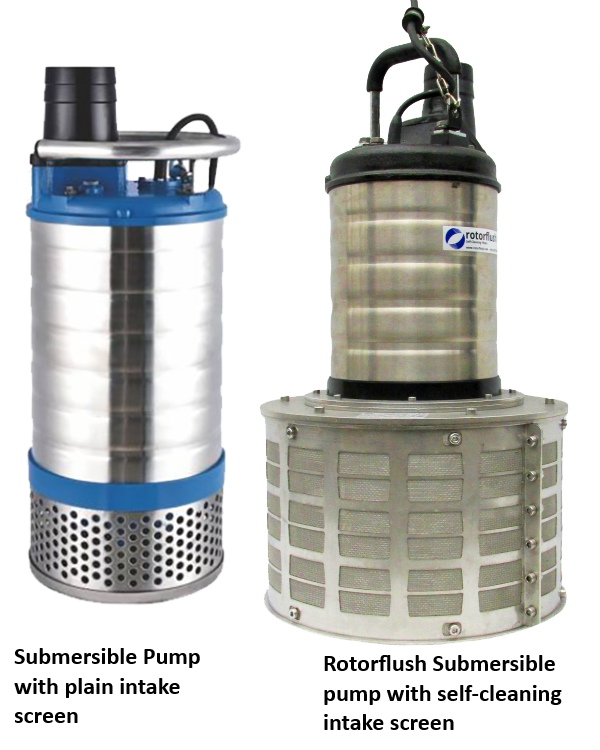
Listen carefully to your pump while it operates. Gurgling noises indicate air entering the system, while grinding suggests failing bearings. First check the inlet screen for debris—this simple fix solves 60% of low-flow issues. If your pump runs but moves little water, test the inlet water pressure with a gauge—it should read 20-40 PSI. Low pressure points to kinked lines or failing pumps.
Ensure Even Water Distribution Across All Pads
Water must flow consistently across the entire pad surface. If you notice dry spots, inspect distribution tubes for clogs. Mineral deposits often accumulate in spray nozzles, especially in hard water areas. Clear blockages with a small wire and flush the system thoroughly. Pro tip: Adjust your bleed-off rate to 10-15% of total water flow to prevent mineral buildup while conserving water. If you’re using more than 10 gallons per hour, you likely have a leak or overflow problem.
Fixing Electrical and Motor Issues Safely
Troubleshoot Motor Start Problems Step by Step
If your motor hums but won’t start, the start capacitor has likely failed. Safety first: Always disconnect power at the circuit breaker before testing electrical components—never rely solely on the wall switch. Use a multimeter to test the capacitor: set it to microfarads and compare the reading to the rating printed on the capacitor. Replace if the measurement falls outside ±10% of the specified value.
Verify Float Valve and Thermostat Operation
Check your float switch with a continuity tester—it should complete the circuit when the float rises. A stuck switch prevents the pump from running. Also test thermostat calibration with a calibrated thermometer; it should maintain temperature within ±2°F of your setpoint. Warning: Exposed electrical connections near water create serious shock hazards—ensure all components stay at least 12 inches above the highest water level.
Eliminating Annoying Swamp Cooler Noises

Stop Vibration Before It Damages Your Unit
Excessive vibration usually means an unbalanced blower wheel. Remove the blower and clean all surfaces, then spin it by hand—it should rotate smoothly without wobble. An imbalance as small as 0.5 ounces causes significant vibration at operating speed. Tighten all mounting bolts to 10-15 foot-pounds torque to secure the assembly.
Silence Rattles and Humming Sounds
Tighten every screw and fastener, especially motor mounts and blower housing connections. A loose panel creates surprising noise at high speeds. For persistent vibration noise, install rubber grommets or washers between metal components. Quick fix: Place a folded piece of cardboard between vibrating parts to test if the noise stops before making permanent modifications.
Prevent Future Breakdowns With Smart Maintenance
Follow This Essential Weekly Maintenance Routine
Check water level daily during peak season—maintain the sump at 2/3 capacity. Test the bleed-off system weekly to ensure it’s discharging 10-15% of water flow, which prevents mineral concentration. Clean the pump intake screen every seven days to maintain proper water flow. Record motor amperage weekly—changes exceeding 10% indicate developing problems.
Implement Seasonal Maintenance That Extends Lifespan
At season start: Flush the entire system with a vinegar solution, replace pads if more than two seasons old, lubricate motor bearings with high-temperature grease, and adjust belt tension. At season end: Drain completely to prevent freeze damage, remove and store the pump indoors, apply protective coating to metal surfaces, and seal openings against pests. Expert note: Proper seasonal maintenance extends pump life from 3-5 years to 7+ years.
Final Note: When swamp cooler repairs exceed these basic fixes—such as complex electrical issues, motor rewinding, or structural repairs—call a professional. They have specialized tools and training to handle these advanced problems safely. After completing any repair, monitor performance for 24-48 hours, checking for smooth operation, proper cooling, and abnormal noises. Keep a simple log of water consumption and temperature drop to establish baseline performance and catch issues early. With regular attention to these critical components, your swamp cooler will deliver efficient, cost-effective cooling for years to come.