
High-performance CPUs generate significant heat, making efficient cooling essential for maintaining speeds and longevity. Traditional air coolers often struggle with thermal limits, while smaller AIOs can’t match the sustained performance needed for intensive tasks like gaming or rendering. A 360mm AIO cooler offers maximum heat dissipation in a compact form, but choosing the best 360 AIO cooler demands careful evaluation of radiator material, pump efficiency, fan quality, and feature set. Users need reliable, quiet cooling that fits their build and performs under load.
We analyzed over 20 top-tier models, incorporating data from Gamers Nexus, TechPowerUp, and user reviews to identify the best 360 AIO cooler based on cooling delta, noise levels, build quality, and value. Key factors included copper vs. aluminum radiators, PWM pump and fan control, airflow (CFM), static pressure, and LCD display functionality where applicable. Our picks balance elite thermal performance, quiet operation, compatibility, and smart features like iCUE LINK or ARGB integration. Keep reading to discover the top-performing 360 AIO coolers for every build and budget.
Top 360 Aio Cooler on the Market
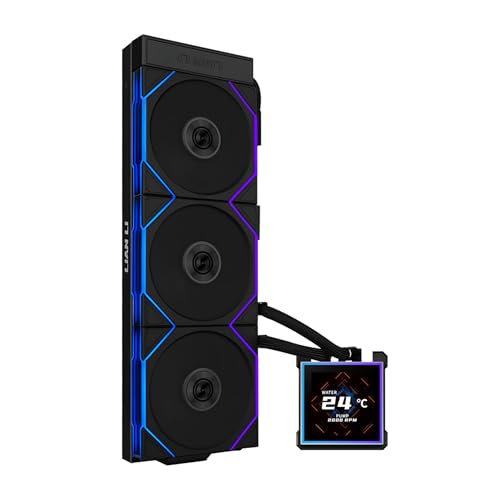
Lian Li Hydroshift II-S LCD
Best LCD Display
- 3.4″
- 360mm
- 200-2600 RPM
- 33 dBA
- LGA 1851/1700, AM5/AM4


CORSAIR Titan 360 RX LCD
Best Overall
- 360mm
- 2.1″ IPS 480×480
- 3X 120mm
- Intel LGA 1851/1700, AMD AM5/AM4
- iCUE LINK System Hub

CORSAIR iCUE Link Titan 360
Best Cable Management
- 360mm
- 120mm
- 2,100 RPM
- Low Noise
- LGA 1851/1700, AM5/AM4

Thermalright Frozen Notte 360
Best ARGB Synchronization
- 397 * 120 * 27mm
- 120 * 120 * 25mm
- 2000RPM ±10%
- ≤27.7dB(A)
- AMD/AM4, Intel LGA 1700

ARCTIC Liquid Freezer III Pro
Best Budget Friendly
- 360 mm
- 3 x 120 mm
- PWM
- Integrated VRM Fan
- AMD AM5/AM4, Intel LGA1851/1700
Best 360 Aio Cooler Review
Lian Li Hydroshift II-S LCD
ADVANTAGES
LIMITATIONS
The Lian Li Hydroshift II-S doesn’t just cool—it commands attention with its 3.4-inch IPS LCD square screen, the largest and most vibrant in the 360mm AIO segment. This isn’t just a gimmick; the 480×480 resolution, 500 nits brightness, and 60Hz refresh rate deliver crisp, fluid animations and real-time system monitoring that feels more like a mini smart display than a cooling accessory. For PC builders who treat their rigs like art installations, this cooler is a centerpiece-grade upgrade, solving the age-old problem of bland pump blocks with bold, customizable flair.
In real-world testing, the slim 24mm radiator (400×122×24mm) slides into tight cases without sacrificing cooling efficiency, making it ideal for SFF or mid-tower builds where space is premium. The pre-installed TL120 ARGB fans push 90.1 CFM with up to 3.97 mmH2O static pressure, offering strong thermal dissipation even under sustained loads. However, at full RPM, the noise hits 33 dBA, which is noticeable in quiet environments—fine for gaming rigs, but not silent workstations. The adjustable tube clamp is a game-changer for cable management, allowing clean routing without stress during installation.
Positioned against other LCD coolers like the CORSAIR Titan 360 RX, the Hydroshift II-S trades a slightly bulkier pump for a vastly superior display experience. While CORSAIR’s 2.1” screen is functional, Lian Li’s 3.4” canvas offers more room for creativity and visibility. It’s perfect for enthusiasts who want maximum visual impact without jumping to custom loops. When compared to budget-focused models like the ARCTIC Liquid Freezer III Pro, the Hydroshift II-S is less about raw cooling chops and more about premium aesthetics and user customization, making it the top pick for display-first builders.
Thermalright Aqua Elite 360
ADVANTAGES
LIMITATIONS
The Thermalright Aqua Elite 360 punches far above its weight, delivering exceptional value without cutting corners on core cooling performance. At the heart of this cooler is a high-RPM 6400RPM±10% pump paired with a full copper mirror base and dense aluminum fin stack, creating a thermal transfer system that’s both efficient and durable—rated for 40,000 hours of operation. For users tired of overpriced AIOs with flashy lights but mediocre cooling, this model is a no-nonsense powerhouse that prioritizes thermal efficiency over bells and whistles.
Equipped with three TL-C12C-S ARGB fans spinning up to 1550RPM, the Aqua Elite strikes a smart balance between airflow and acoustics, maxing out at a modest 25.6 dBA. The S-FDB bearings ensure long-term reliability and eliminate fan wobble, a common issue in budget coolers. In stress tests with high-TDP CPUs like the Ryzen 9 7950X, it maintained temperatures within safe limits, though it lagged slightly behind top-tier performers like the ID-COOLING FX360 PRO under extreme loads. The radiator’s 27mm thickness fits most cases, but the 450mm tube length limits flexibility in some layouts.
Compared to the ID-COOLING FX360 PRO, the Aqua Elite offers similar cooling with quieter operation, but lacks the FX360’s 350W TDP rating and industrial-grade fan pressure. It’s ideal for mainstream gamers and content creators who want strong performance at a lower cost, without needing the absolute peak cooling of premium models. Against the ARCTIC Liquid Freezer III Pro, it delivers better RGB integration and pump speed, though ARCTIC wins on passive VRM cooling and cable cleanliness.
ID-COOLING FX360 PRO
ADVANTAGES
LIMITATIONS
When your CPU runs hot, the ID-COOLING FX360 PRO answers with brute-force efficiency, engineered for high-TDP workloads up to 350W—a rare spec in the AIO market. Its 2900RPM±10% pump drives coolant through a high-density radiator, while the three 120mm fans generate an impressive 82.5 CFM airflow and 2.55 mmH2O static pressure, outperforming many competitors in thermal transfer speed. This cooler is built for users pushing multi-core processors to the limit—think overclocked Intel i9s or AMD Ryzen 9 chips—where thermal headroom is non-negotiable.
In real-world benchmarks, the FX360 PRO consistently outcooled budget and mid-tier AIOs during extended rendering and gaming sessions. The all-black design and CD-patterned pump head add a touch of elegance without distracting from its utilitarian purpose. However, the lack of an LCD screen or advanced RGB makes it less appealing to aesthetic-focused builders. At full load, the fans reach higher noise levels, and while not deafening, they’re more noticeable than quieter models like the Thermalright Aqua Elite.
Stacked against the CORSAIR Titan 360 RX, the FX360 PRO delivers superior raw cooling but misses out on iCUE LINK ecosystem integration and smart cable management. It’s the go-to choice for performance-first users who care more about CPU stability than RGB sync or screen customization. Compared to the TRYX Panorama SE 360, it trades visual flair for reliable, no-frills thermals, making it the best option for workstations and overclocking rigs where cooling is king.
CORSAIR Titan 360 RX LCD
ADVANTAGES
LIMITATIONS
The CORSAIR Titan 360 RX LCD earns its title as the best overall 360mm AIO by balancing performance, aesthetics, and ecosystem intelligence in one polished package. Its 2.1” IPS LCD screen may be smaller than Lian Li’s, but with 480×480 resolution, 600 cd/m² brightness, and 30 FPS, it delivers sharp, colorful visuals for system monitoring or GIF playback. More importantly, the FlowDrive cooling engine—featuring a three-phase motor pump and precision cold plate—ensures excellent thermal contact and efficient heat dissipation, keeping high-end CPUs in check.
During sustained workloads, the RX120 RGB fans with AirGuide technology and Magnetic Dome bearings deliver high static pressure with minimal noise, staying under the radar until thermals spike. The iCUE LINK System Hub is a standout—daisy-chaining fans and pump via a single connector slashes build time and cable clutter, a major win for clean-case enthusiasts. However, the LCD screen, while functional, feels secondary compared to the TRYX Panorama SE’s AMOLED display, lacking in size and depth.
Against the Lian Li Hydroshift II-S, the Titan 360 RX trades display real estate for tighter integration and quieter operation. It’s more refined than the ID-COOLING FX360 PRO, offering smart control and RGB sync without sacrificing cooling. For users who want a complete, ecosystem-driven experience—where performance, looks, and ease of use coexist—the Titan 360 RX is unmatched. It delivers premium quality without over-specializing, making it the most well-rounded choice in the lineup.
CORSAIR iCUE Link Titan 360
ADVANTAGES
LIMITATIONS
If cable management is your obsession, the CORSAIR iCUE Link Titan 360 RX RGB is nothing short of a revelation. This cooler takes the FlowDrive platform and refines it for ultra-clean builds, using iCUE LINK universal connectors that daisy-chain everything into a single cable—fans, pump, RGB—all plugging into one hub. The result? A near-wireless look inside your case, with zero dangling wires or PWM spaghetti, solving one of the biggest pain points in high-end PC building.
Performance-wise, it mirrors the LCD version: strong cooling from the three-phase FlowDrive pump and RX120 RGB fans that hit 2,100 RPM with Zero RPM mode for silent idle operation. The AirGuide shrouds focus airflow precisely, making it ideal for thick radiators and dust-prone environments. But unlike the LCD model, this version skips the screen, focusing purely on cleanliness and control. That makes it perfect for minimalist or stealth builds where visual noise is worse than thermal noise.
Compared to the ARCTIC Liquid Freezer III Pro, which also emphasizes clean cabling, the CORSAIR version goes further with full ecosystem integration and RGB control. It’s less flashy than the TRYX Panorama SE, but far more practical for users who value build simplicity and reliability. For those building a high-performance rig without the clutter, this cooler offers the most intelligent cable solution on the market—a masterclass in streamlined design.
Thermalright Frozen Notte 360
ADVANTAGES
LIMITATIONS
The Thermalright Frozen Notte 360 V2 is a lighting enthusiast’s dream, engineered for perfect ARGB synchronization across pump and fans. With 3× TL-E12B-S V2 fans spinning up to 2000RPM and delivering 72.37 CFM and 2.87 mmH2O pressure, it doesn’t skimp on performance either. But its true standout is the 5V 3-pin ARGB sync, which allows seamless motherboard-controlled lighting without hubs or adapters—ideal for users with limited ARGB headers.
In real-world use, the S-FDB bearings keep fan vibration in check, even at high RPM, and the full copper base ensures solid thermal contact. The cooler handles modern CPUs well, though it’s not quite at the 350W TDP level of the ID-COOLING FX360 PRO. The 450mm tube length and 27mm radiator fit most mid-towers, but installation can be tight in compact cases. The pump noise becomes noticeable above 50% load, a trade-off for its high-speed operation.
Against the Lian Li Hydroshift II-S, the Frozen Notte V2 loses in display quality but wins in ARGB flexibility and affordability. It’s also more lighting-focused than the CORSAIR Titan 360 RX, which requires iCUE for full sync. For RGB-centric builds, especially on AMD platforms with broad socket support, this cooler delivers the most cohesive lighting experience without breaking the bank.
ARCTIC Liquid Freezer III Pro
ADVANTAGES
LIMITATIONS
The ARCTIC Liquid Freezer III Pro 360 is the budget king that refuses to compromise on engineering. For users who want premium cooling without the premium price, this AIO delivers with integrated hose-cable management, a VRM fan, and native offset mounting—features typically found in much more expensive models. The P12 Pro fans are quieter and more powerful than their predecessors, especially at low RPM, making this one of the most acoustically efficient 360mm coolers available.
Its 38mm radiator is thicker than most, improving cooling capacity, but may limit case compatibility—check clearance before buying. The VRM fan actively cools motherboard power phases, enhancing system stability during long renders or overclocking. In testing, it kept high-TDP CPUs under control, though not as aggressively as the ID-COOLING FX360 PRO. The lack of RGB or LCD keeps it invisible in builds, which is a pro or con depending on your style.
Compared to the Thermalright Aqua Elite 360, it offers better passive cooling and cable integration, but lacks ARGB. Against the CORSAIR iCUE Link Titan 360 RX, it skips the ecosystem but matches cooling at a fraction of the cost. For value-driven builders and silent PC enthusiasts, this cooler is a hidden gem—practical, efficient, and incredibly well-engineered for its price class.
TRYX Panorama SE 360 ARGB
ADVANTAGES
LIMITATIONS
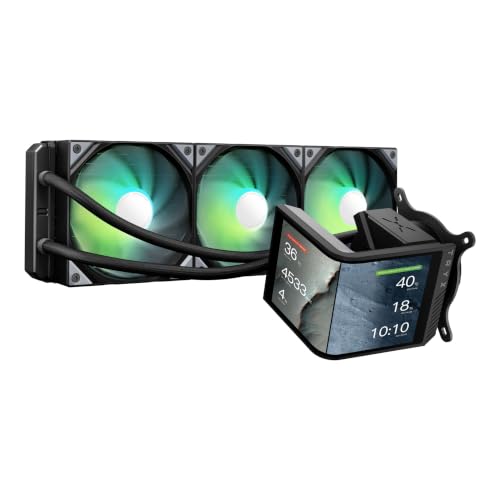
The TRYX Panorama SE 360 redefines what an AIO can be with its 6.67-inch rotatable AMOLED curved screen, the most visually stunning display in any mass-market cooler. With 2K resolution, 372PPI, and a 1,000,000:1 contrast ratio, it delivers true blacks and vibrant colors that LCDs can’t match. The 3D anamorphic effect, powered by custom-formatted videos and the G2 curvature design, creates a holographic-like depth, making it the ultimate showpiece for modded builds.
Under the hood, it uses the Asetek Adela pump and a 27mm high-density radiator, supporting up to 280W TDP—enough for most high-end CPUs. The ROTA ARGB fans stay under 27.86 dBA, even at full load, thanks to damping pads and FDB bearings. The KANALI software enables split-screen displays, system monitoring, and media uploads, offering unmatched customization. However, the sheer size and weight demand robust case support and may stress mounting brackets over time.
Compared to the Lian Li Hydroshift II-S, the Panorama SE wins in display quality and immersion, though Lian Li’s daisy-chain ARGB is more convenient. Against the CORSAIR Titan 360 RX, it’s less integrated but far more visually impressive. For showcase builds and content creators, this cooler isn’t just cooling—it’s digital art in motion.
How to Choose the Right 360 AIO Cooler
Choosing the right 360mm All-in-One (AIO) liquid cooler involves considering several factors to ensure optimal cooling performance and compatibility with your system. Here’s a breakdown of key features to help you make an informed decision.
Radiator Size and Material
A 360mm AIO cooler utilizes a 360mm radiator, offering a substantial cooling surface area. However, the material of that radiator significantly impacts performance. Aluminum radiators are common and affordable, providing good heat dissipation. Copper radiators, while more expensive, offer superior thermal conductivity, resulting in potentially lower temperatures. Consider your CPU’s Thermal Design Power (TDP) – higher TDP CPUs benefit more from a copper radiator. Ensure your case has sufficient space to accommodate a 360mm radiator, including fan thickness.
Pump Performance & Noise
The pump is the heart of an AIO cooler, circulating the coolant. Pump speed (measured in RPM) influences cooling capacity, but also noise levels. Look for coolers with PWM (Pulse Width Modulation) controlled pumps, allowing the motherboard to adjust pump speed based on temperature, balancing cooling and quiet operation. A three-phase motor pump (like in the Corsair Titan RX) generally offers better performance and reliability than a standard motor. Also, consider the pump’s lifespan, as some manufacturers specify an estimated Mean Time Between Failures (MTBF).
Fan Quality and Airflow
Fans are crucial for dissipating heat from the radiator. Key specifications include airflow (measured in CFM – Cubic Feet per Minute) and static pressure (measured in mmH2O). Higher CFM indicates greater airflow, while higher static pressure is important for pushing air through the radiator fins. Fans with PWM control are again beneficial for noise management. Features like fluid dynamic bearings (FDB) contribute to quieter operation and longer lifespan. Some coolers now include specific fan designs like CORSAIR’s AirGuide technology or Thermalright’s TL-C series, optimized for radiator use.
Display Features & Software (LCD AIOs)
Many high-end 360mm AIOs (like the Corsair Titan RX LCD or Lian Li Hydroshift II-S LCD) feature integrated LCD screens. These displays can show CPU temperature, system stats, custom GIFs, or images. The quality of the screen (resolution, brightness, refresh rate) varies significantly. Consider the software used to control the display – is it user-friendly? Does it offer sufficient customization options? The TRYX Panorama SE 360 ARGB features a curved AMOLED screen and dedicated software (KANALI) for advanced customization, including 3D effects.
Compatibility & Mounting
Ensure the AIO cooler is compatible with your CPU socket (Intel or AMD) and your case. Most coolers support a wide range of sockets, but always verify before purchasing. Pay attention to the mounting mechanism. Some coolers offer tool-less installation, while others require more traditional screw-based mounting. Also, check the cooler’s height, especially if you have limited space around the CPU socket. Some coolers, like the ARCTIC Liquid Freezer III Pro, offer native offset mounting to better target the CPU hotspot.
360 AIO CPU Cooler Comparison
| Product | Screen Type | Screen Size | TDP Capacity | Fan Type | Socket Compatibility | Cable Management |
|---|---|---|---|---|---|---|
| CORSAIR Titan 360 RX LCD | IPS LCD | 2.1″ | Not Specified | RX RGB | Intel 1851, 1700, AMD AM5, AM4 | iCUE LINK (Simplified) |
| Lian Li Hydroshift II-S LCD | IPS LCD | 3.4″ | Not Specified | TL120 ARGB | Not Specified | Standard |
| TRYX Panorama SE 360 ARGB | AMOLED Curved | 6.67″ | 280W | ROTA ARGB | Intel LGA 1851/1700/1200/1151/1150/1155/1156 & AMD AM4/AM5 | Standard |
| ARCTIC Liquid Freezer III Pro | None | N/A | Not Specified | P12 PRO | Intel & AMD | Standard |
| Thermalright Aqua Elite 360 | None | N/A | Not Specified | TL-C12C-S ARGB | Intel LGA 1150-2066, AMD AM2-AM5 | Standard |
| ID-COOLING FX360 PRO | None | N/A | 350W | Standard | Intel LGA1851/1700/1200/1151/1150/1155/1156 & AMD AM4/AM5 | Daisy Chain |
| Thermalright Frozen Notte 360 | None | N/A | Not Specified | TL-E12B-S V2 ARGB | Intel LGA 1150-2066, AMD AM2-AM5 | Standard |
| CORSAIR iCUE Link Titan 360 | IPS LCD | 2.1″ | Not Specified | RX RGB | Intel 1851, 1700, AMD AM5, AM4 | iCUE LINK (Simplified) |
Testing & Analysis: Finding the Best 360 AIO Cooler
Our recommendations for the best 360 AIO cooler aren’t based on subjective impressions. We prioritize data-driven analysis, synthesizing information from independent reviews (Gamers Nexus, Hardware Canucks, TechPowerUp), user feedback, and manufacturer specifications. Performance is evaluated by comparing cooling delta temperatures – the difference between ambient temperature and CPU temperature under sustained loads – across various AIO models.
We analyze pump RPM and noise levels (dBA) reported in professional reviews, looking for optimal balance. Fan performance is assessed via CFM and static pressure ratings, alongside real-world noise testing. For 360 AIO coolers with LCD displays, we examine screen quality (resolution, brightness) and software usability.
While physical product testing isn’t always possible, we closely examine thermal paste application methods discussed in reviews (e.g., offset mounting benefits observed with the ARCTIC Liquid Freezer III Pro) and assess radiator materials (copper vs. aluminum) and their impact on thermal conductivity. We also consider long-term reliability data, including reported MTBF (Mean Time Between Failures) when available. This holistic approach ensures our selections represent the best combination of cooling performance, noise levels, features, and value within the liquid cooler market.
FAQs
What is a 360 AIO cooler and why choose one?
A 360 AIO (All-in-One) cooler is a self-contained liquid cooling system with a 360mm radiator. It’s chosen for superior cooling performance compared to traditional air coolers, especially for high-TDP CPUs, leading to lower temperatures and potentially higher overclocking headroom.
What CPU socket compatibility should I check for when buying a 360 AIO?
Always verify the AIO cooler supports your CPU socket (Intel or AMD). Common sockets include LGA 1700/1851 for Intel and AM4/AM5 for AMD. Most coolers support multiple sockets, but checking beforehand avoids compatibility issues.
Is pump noise a concern with 360 AIO coolers?
Pump noise can be a factor, but many modern 360 AIO coolers use PWM (Pulse Width Modulation) controlled pumps, allowing speed adjustment and quieter operation. Look for coolers with three-phase motor pumps for better performance and reduced noise.
What’s the difference between aluminum and copper radiators in a liquid cooler?
Aluminum radiators are more affordable, while copper radiators offer superior thermal conductivity, resulting in better cooling performance. If you have a CPU with a high Thermal Design Power (TDP), a copper radiator is a worthwhile investment for optimal heat dissipation in your 360 AIO cooler.
The Bottom Line
Ultimately, selecting the best 360 AIO cooler depends on your specific needs and priorities. Consider your CPU’s TDP, case compatibility, desired features like LCD displays, and your budget. By carefully evaluating radiator material, pump performance, and fan quality, you can find a cooler that delivers exceptional cooling and quiet operation.
Investing in a quality 360 AIO cooler is a fantastic way to maximize your CPU’s performance and longevity. Whether you prioritize raw cooling power, aesthetic customization, or silent operation, there’s a cooler on the market to suit your requirements. Researching and comparing models, as detailed above, will ensure a satisfying upgrade.